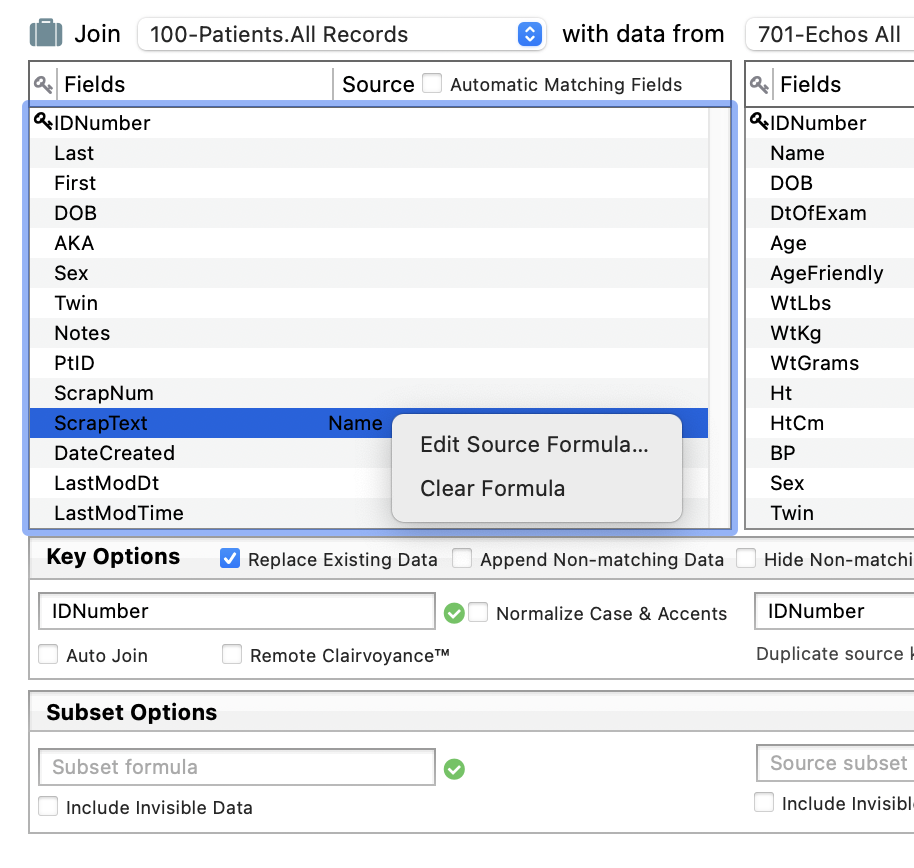
I have two databases: ‘realtor’ and ‘views’. These two databases are linked by ‘realtor_number’.
The ‘realtor’ database has a field called ‘phone’. This is the phone number for the realtor office.
The ‘views’ database also has a field called ‘phone’. However, this is the cell phone number of a specific realtor.
The ‘automatic matching fields’ has matched the ‘phone’ from the ’realtor’ databse with the ‘phone’ from the ‘views’ database. However, these two numbers are different. How do I delete this match-up?
In the Relations panel of the Database Options, uncheck the ‘Automatic Matching Fields’ and then manually drag the relations that you want to happen. You can Click on the existing relations on the left side to clear them if desired.
Thank you! Could you please expand this sentence: “You can Click on the existing relations on the left side to clear them if desired.”
I have tried to clear the automatically matched fields; but uable to do so. I removed the related database; that removed the automatically matched fields. However, as soon as I add the related databased back, the automatically matchwd fields appear (the default for ‘automatic matching fields’ is true) and cannot remove them.
In the Relations panel of the Database Options, uncheck the ‘Automatic Matching Fields’ and then manually drag the relations that you want to happen.
Note that it’s not actually necessary to uncheck this option, you can override the automatic matching fields for specific fields while leaving the rest of the automatic matches intact. Either manually drag in the field you want, or edit the formula. If you just want to turn off a match and not replace it with another field then you would use a formula of "" (empty text).
Why did the matching fields appear but were greyed-out?
Automatically matched fields appear in grey to differentiate them from fields that you have manually specified. You can have a combination of both automatically matched and manually specified fields, the color allows you to tell which is which.