Slow Sharing Issues

Over the past couple of years, I’ve posted periodically on this same scenario. There continue to be unexplained delays that occur and keep the client waiting for excessive amounts of time for the beachballs to go away.

One minute it works fine, the next minute not so fine.

I set a key procedure to loop 8 times with the time required to run each loop being recorded. The loops were recorded as taking 5, 4, 4, 23, 5, 16, 5, and 4 seconds.

The next run of the eight loops resulted in 4, 5 , 22, 5, 4, 16, 4, and 20 seconds. So, it appears to be random as to when the delay occurs.

It’s all the same data, no growing arrays or other debris - which I would expect to cause each run of the loop to take a progressively longer span of time.

The server logs had been showing the record locking activity but I turned off almost all logging without any performance difference showing up.

Changing the database to single user, the loops ran at a consistent 3 seconds.

To see if it made a difference, I tried

serverupdate “off”

serverupdate “on”

uploadrecord

It made no difference.

So, what can we do on the server to eliminate these delays, or at least to better hunt down the cause? It sure seems like some Panorama Server activity must be getting in the wya, but what…?

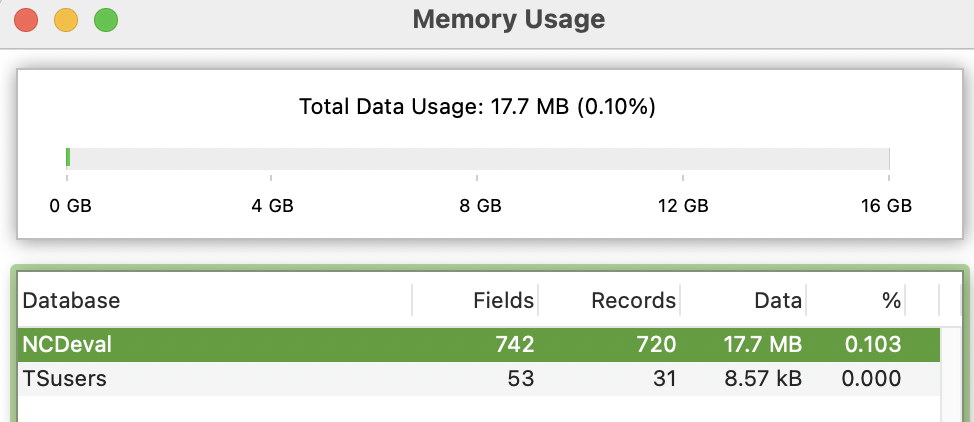
The Finder shows the NCDeval file at 94.6 MB and TSusers at 67.6 MB. Regardless, the computer has plenty of memory.

You’ve written a long post, but with virtually no detail that could be useful in assisting you.

For starters, what do these “loops” do?

Where is the server physically located in relation to the client? Is the server down the hall? Or across the continent? What else is going on on this server? What else is going on on the network this server is attached to (is it in a colo facility)? Do you have some reason to think that this user has the server all to his/herself, or could other users be accessing the server at the same time, which could obviously cause delays. Is the server accessible from the public internet? If it is on the internet, do you have any system to protect it from bots? There are all kinds of shenanigans happening on the internet these days. You seem convinced the delays are happening on the server and not in the connection between the client and the server, do you have a reason for believing this?

Again, you’ve given no clue as to what this procedure does. Apparently locking and unlocking records is part of it. Your database has a lot of fields and by my calculations an average record size of nearly 25k per record. Maybe some records are much larger than that, so you could be slinging some sizable amounts of data up and down simply by locking and unlocking a single record. When you loop your procedure 8 times, are you ensuring that the same data is being operated on each time, or could it be different.

You mention benchmarks run in single user mode, but of course in that case all transmission delays are zero. And also, in the single user case, there is obviously no possibility of other delays while waiting for other users.

An important point - Panorama server handles incoming requests sequentially. So if multiple users are using the server, their requests will be run “round robin” style. This can definitely result in delays.

You haven’t mentioned whether web publishing is in use on this server, but web requests are also processed sequentially. So a lot of incoming web requests can result in delays seen by both sharing clients and by other web requests. This is why it’s especially important to make sure that web requests are handled quickly. Panorama’s sharing code is already written that way, all requests use the minimum amount of code necessary so that there is as little delay as possible. However, operations like synchronizing a large database can take quite a bit more time than something like locking a record.

Bottom line, your results sound like either network delays, congestion delays, or a combination of both. If congestion delays are a big problem, upgrading to a faster processor on the server can help.

My point was to illustrate that there is a problem, and that it seems to be Panorama Server causing the delays. I had no expectation that you could diagnose the issue from what I provided. I believe strongly that the delay is with Panorama Serbver. Thus my question was "what can we do on the server to eliminate these delays, or at least to better hunt down the cause?”

The server is solely sharing with a small user base; no web serving. The slowdowns occur whether it’s run on a remote server or local as server and client. When testing, I have been the sole user. It has been tested on 3 Mac servers, one being an M4 Mini Server.

The procedure I chose to run is just one of the many that experience the slowdowns. My loop was simply to run a given procedure repeatedly to see how it performed from one time to the next. Clearly, it ran into lengthy delays every few times it ran, during which we get to watch a beachball.

It wouldn’t seem to matter what the procedure is doing, considering that virtually all of them experience the same slowdowns. Since it’s doing the very same thing over and over, it would be expected that the time to run would be consistent. It is when in single-user mode. A range of 4 to 20+ seconds strikes me as a huge variance.

It is the same record with all the same data.

As noted, it’s all being tested on a single record. I would assume that locking and unlocking times would be consistent for every run of the procedure, but as I wrote, I tried to find a way to use serverupdate “off” in order to see if that would make a difference.

I don’t see any of those being the issue per info I’ve provided above.

So, I’m still under the impression that Panorama Server is periodically bogging down and we have to wait for it. With that, I revert to my question about what we can look for or try to discover the cause and fix it.

In general, Panorama Server doesn’t have anything to bog down. With one exception I’ll discuss below, it does not run any background tasks, and except for searching for records, it doesn’t have any loops. It does search the database every time you lock or unlock a record, but this is a super fast search based on the record ID number. The record ID number is built into each record, so performance of this search won’t depend on how many fields are in the record. However, it will take longer to find a record at the end of the database rather than at the beginning. But since you say you are always dealing with the same record, this should be a constant speed. Also, it would take a really huge database to get up to the kind of delay you are talking about, probably at least millions of records.

So let’s discuss the one background task the server does run - auto-save. Panorama is of course RAM based, but the data eventually needs to be saved permanently to disk. Since saving to disk is relatively slow compared to in RAM operations, it doesn’t do this every time a change is made. Instead, it sets a delay to save later. If you make a bunch of changes during the period of this delay, this can save a lot of time. On the other hand, if Panorama crashed for some reason during this delay (for example a power failure), the changes wouldn’t be saved (though they are also saved in the journal for redundancy). So you may want the delay longer or shorter, and you can change this delay in the Settings.

image

So maybe the delays you are seeing are caused when the auto-save happens? That still seems like a very long delay to save a 100Mb database, but maybe? A good test might be to set the timeout to zero. This will cause the auto-save to happen immediately. If this is the cause of the delays, then you might see the delay every time you run through the loop.

Note - you won’t see any auto-save delay unless you perform another operation immediately. When the client makes a request, the server doesn’t wait for the save to complete before returning the results of the request to the client. Instead, the save happens after the request is finished. So you’ll only notice the auto-save delay if you turn around and immediately make another request. If the server is in the middle of performing an auto-save, the next request will be delayed until the auto-save is finished.

If auto-save is the source of these delays, you will be able to significantly mitigate the delays by increasing the auto-save time. The default is 1 second, but it can be increased to anything you want, even minutes.

The Finder shows the NCDeval file at 94.6 MB and TSusers at 67.6 MB.

I imagine you are mentioning this because the memory usage window shows much lower values of 17.7MB and 8.57kB. This is because the memory usage window ONLY shows the amount of memory used by the DATA. The rest of the size you see in the Finder is the space used by forms and procedures. So your databases are mostly forms and procedures, especially the TSusers file which appears to be less than 1% data. Procedures are small, so maybe you have tens of megabytes of forms? I would think the only way to do that would be to have tens of megabytes of static images in the forms.

If auto-save is the source of these delays, that would seem to indicate that it is taking more than 10 seconds to save these files. Does that sound plausible to you? How long does it take if you just press Command-S? I don’t have any 100Mb files handy at the moment, but I just tried a 12Mb file and it saves in about a tenth of a second. But I don’t have any databases with tens of megabytes of forms in them. Maybe that is slower to save?

Another possibility I wonder about is if somehow the file system is on the computer is falling asleep, and has to be woken up to save? I don’t think that’s a thing, especially on SSD based systems, which you are probably using. But maybe?

If the problem is that you have forms with tens of megabytes of static images in the forms, maybe that’s why this issue hasn’t been reported by anyone else. In that case, you might get a big performance booth by switching to Image Display objects, with the images in a separate folder instead of built into the forms themselves. Of course that would create an additional issue in that you would have to somehow distribute the images to all of the clients, right now Panorama is taking care of that for you. But possibly at a cost of these performance issues.

This is all just an educated guess. The problem may have absolutely nothing to do with this at all. But I guess it does give you something to research further.
(Just discovered that this was written days ago, but never posted)

I think you nailed it. Auto-Save appears to have been the issue.

At 0, it brought the program to its knees. At 300, it runs steadily with no apparent delays, per numerous tests I just ran. We’ll know for sure once the business using it reports back.

If it’s “cured”, they’ll need to decide on how often it should Auto-Save, or add Save to particular events.

Save takes only a few seconds, so while it may now be a moot point, does Auto-Save back up if it has to wait before running? In other words, could Auto-Save end up running a few consecutive times if it hasn’t had previous opportunities?

In other words, could Auto-Save end up running a few consecutive times if it hasn’t had previous opportunities?

No. It will only run once.

Here’s how it works. In a single user database, when you use the save statement Panorama saves the file immediately.

On a server, using the save statement starts a timer to save the database later. However, if that timer has already been started, it won’t start again. You’ve set the timer to 300. That means that it will save at most one time each 300 seconds. No matter how many operations you perform during that 300 second interval, it will only save once at the end. Then the process starts over again the next time there is an operation.


You say this was written days ago but not posted. Has the customer reported back to you?

At 300, they’re reporting that the program has been running much faster and there have been no more of the delays. They add a “knock on wood” but I’m pretty certain it’s fixed. I don’t know if I should turn it back down a bit but now that we know what the issue was.