I finally investigated why I get an error message saying the check amount I entered doesn’t equal the total of the invoices paid. How can this happen?
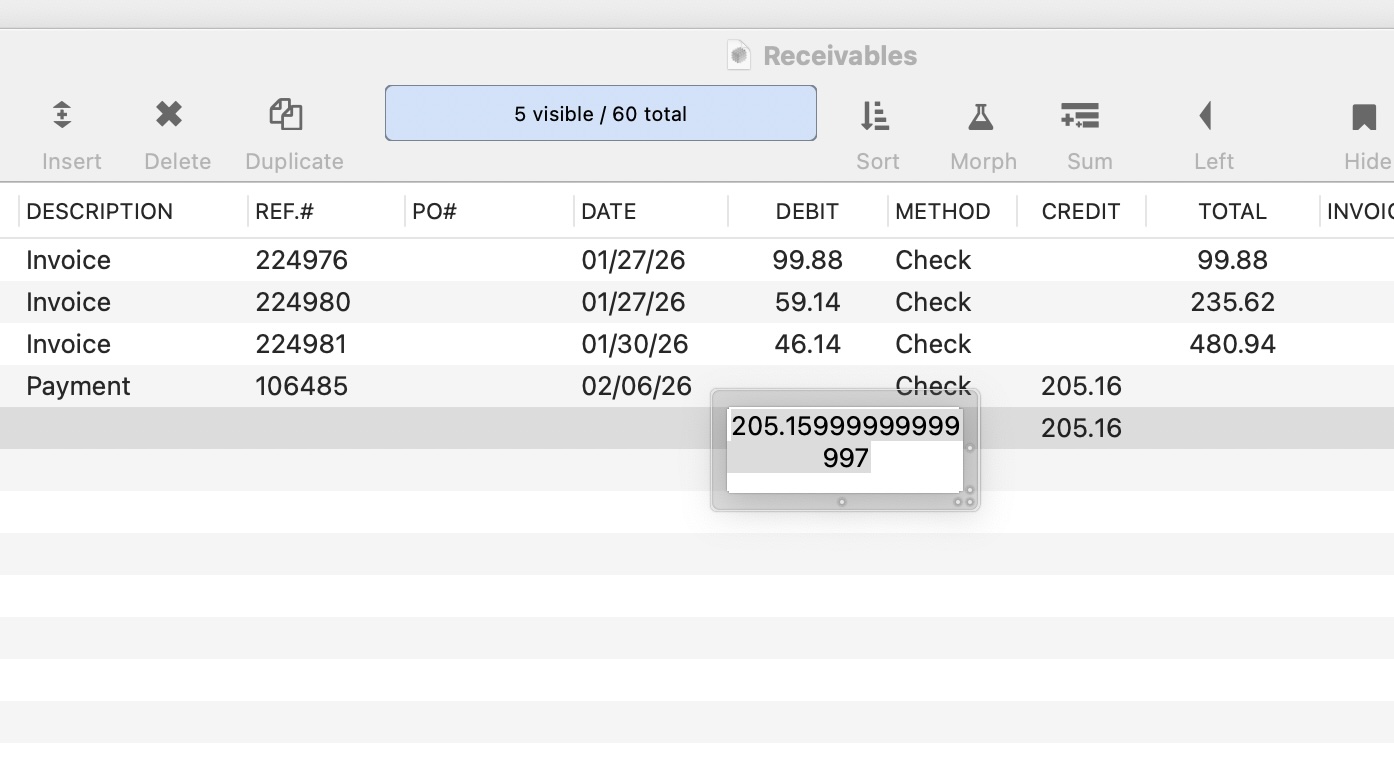
This is the natural result of doing arithmetic with floating point numbers. Most numbers that terminate as decimals repeat as binaries. The repeating pattern goes on forever, but floating point numbers are limited to 53 binary digits, so each decimal value will need to be rounded to the nearest 53 digit binary value.
To 17 significant decimal figures, 99.88 rounds to approximately 99.879999999999995
59.14 rounds to 59.140000000000001
and 46.14 rounds to 46.140000000000001
When those 3 roundoff errors are added together, they differ from the single roundoff error when 205.16 is rounded to the nearest 53 digit binary.
Comparing floating point numbers for equality rarely ever works, rather you should take the difference rounded to the penny, and see if that is zero.
The DEBIT field has an output pattern, #.##, however, these debit amounts are imported by procedure in money format. Adding the round function fixes the error message and the summary record is temporary.
David’s explanation is exactamundo. Which floating point values for fractional decimal are not.
Greg, I don’t know what you mean by “debit amounts are imported by procedure in money format”. Panorama doesn’t have a money format. There are two types of numbers, integers and floating point numbers
Floating point numbers are stored and manipulated using the IEEE floating point standard, which is built into macOS, and actually built into the processor chip. This format stores the numbers in a binary floating point format (base 2). For whole numbers (integers), this provides exact values. But for fractional values, many decimal fractions cannot be exactly represented in binary floating point format. For example, take the value 59.14. There is NO binary floating point value that corresponds to this decimal fraction. The closest possible binary value is 59.140000000000001. So when you set a floating point value to 59.14 (whether by data entry, importing, via a procedure assignment, it doesn’t matter) what is actually stored is 59.140000000000001. Usually you display a rounded value, so it doesn’t matter. But if you combine multiple values with arithmetic operators, these small deviations can add up a bit. Because of this, it turns out that.
99.88 + 69.14 + 46.14
does NOT exactly equal
205.16
It’s close, but not exact. So when comparing floating point numbers for equality, what you actually have to do is calculate the difference, and then look for a difference below a threshold. If below that threshold, then you can consider the values to be equal.
let a = 99.88 + 69.14 + 46.14
let b = 205.16
let threshold = 0.000000001
if abs(a - b) < threshold
    // values are close enough to be considered equal
endif
In the example above I picked 0.000000001 as the threshold, but that’s not a universal value. You need to pick the threshold that is appropriate for your application. For money, that might be 0.01 (i.e. a penny).
Note that this is not specific to Panorama X - it applies to any software that uses binary floating point values. Since that is the standard that is baked into all software today, this applies to most software. But there are other methods for encoding fractional values. Some of these methods do allow fractional decimal values to be stored exactly, and so don’t encounter these problems, But there’s no free lunch, these methods have other drawbacks and compromises. Since IEEE 854 floating point is the standard, I decided to just go with that in Panorama X.
What about converting the “money” value to an integer as soon as possible, like making ddd.dd into ddddd - rounding at that stage as appropriate. Then doing all other activities with the integers. When it comes to display, show ddddd/100 with an appropriate pattern?
Is there any benefit in that with respect to speed or storage?
Paul, what you are describing is essentially how Panorama 1-6 worked with fixed point values. You could specify that a field was a number with 1, 2, 3, or 4 places after the decimal point, and Panorama would actually store these numbers as integers. This did avoid the problem Greg described above but also caused all sorts of other problems with underflow and overflow.
There are computer science techniques for storing numbers with infinite precision which avoids all of these problems. However, these techniques are almost never used because performance (speed) is atrocious and they also consume huge amounts of memory.
Is there any benefit in that with respect to speed or storage?
When Panorama 1.0 was being written in 1986 there were significant advantages for using integers rather than floats in regard to both speed and storage. Floating point numbers are 64 bits (8 bytes), back in 1986 integers were only 32 bits (4 bytes). And on the hardware of the 80’s, integer calculations were much faster than floating point calculations.
However, that was 40 years ago - silicon has come a long way since then. Integers are now 64 bits, so there’s no storage difference between integers and floating point numbers. And CPU designers have made huge investments in floating point computation, so there’s really no speed difference either. So when Panorama X was being developed, I dropped the insanely complicated system that Panorama used to use to allow for both fixed and floating point numbers to be mixed in calculations. There’s no other modern software that I know of that uses such a system. It made Panorama’s calculation engine much simpler to implement and also much simpler to use, as the oddities of fixed point math would definitely trip up some users.