PebbleCreek Golf Resort Member History (get from EN proshop)
((Name (LAST (2sp) FIRST (1sp) MI)), Chelsea # (8 digits), Course (irrelevant), Tee Time (irrelevant))
Combined Rosters of PCMGA (from Art Plate, to be maintained as new members join PCMGA)
(Name (First (1sp) Last), GHIN # (6-8 digits), Chelsea #)
Scores Posted Day of Audit (from USGA)
(Name, GHIN# (6-8 digits))
Combined rosters have data for all PCMGA members and is the controlling document. On the selected day of the audit, currently all players scheduled to play that day are entered into an Excel spreadsheet from the Member History Report (Chelsea). A macro is run against the combined roster to establish if the PCMGA member played that day (0=Yes, 1=No). Finally, the member list that played on the day (per Chelsea) is compared to the “Scores Posted Day of Audit”. Members who did not post are assigned a penalty score calculated on the GHIN portal.
Problem:
How to compare names in the Chelsea system to the USGA scoring record automatically and create an exception report? Chelsea doesn’t have a provision to enter the GHIN number. Name formats in Chelsea are not the same as the PCMGA roster and GHIN listing. The final step in the current Excel process is to manually compare names of people who played vs. those who have posted their scores.
Any ideas on how to attack this? By way of full disclosure, I haven’t used Panorama for much (if any) complicated work in recent years and am an “old newbie”…
What you have posted so far is not a Panorama question.
I would say the first step is to clearly understand what you want to do. I really can’t make heads or tails of what you have posted here.
I do see that one problem you have somewhere in there is names stored in different formats. If the format for the names is CONSISTENT within each data source, then conversion will not be a problem. Panorama has plenty of text manipulation functions that can easily rearrange the components of the names to get them in the same format. But that will only work if the names are in a consistent format. If not, there will be no alternative but manual work by a human.
Since the first two sources contain Chelsea #'s (whatever that is - I assume it’s a unique ID number?), you can combine these two data sources using that number. If they are in two different databases you can use Panorama’s relational join feature.
Then at that point you could combine the “Scores Posted Day of Audit” with the other data by using the GHIN# as the key. I assume that’s another unique ID number.
You say that you want “an exception report” and seem to think we should know what that is. I’m afraid I have no clue. But if you can generate it with an Excel macro then certainly it can be done with Panorama.
Thank you, Jim. BTW, you need to get out and golf more! Copy that on the name formats. That is part of the issue and I can easily take care of that given Panorama’s very powerful tools for doing same. The other part is somehow getting the GHIN # paired up with the names in the first list (Member History). Chelsea is a unique number assigned to each player in our tee time reservation system. And, yes, the Gross Handicap Information Number is a unique number assigned by the U.S. Golf Association to each golfer with a handicap maintained on their system. The problem to be tackled is we have 700 members ± in the Men’s Golf Association (one list), players that were on the schedule that played on the day of the audit (second list) which included many non-PCMGA members that need to be filtered out, and a list of players that posted their score to the GHIN system (third list). By an exception list, I mean I’d like to get a list of the 8-15% of PCMGA players that were in the Chelsea reservation system, played on any given day, are members of the PCMGA, and did not post their score to the GHIN system. I hope that clears up some of the murky details. I’m sure this can be handled in Panorama. I’m not familiar with the “Relational Join” feature, but that is certainly what we’re dealing with…three different lists that ultimately will be used to prepare a report. Thank you for your comments!
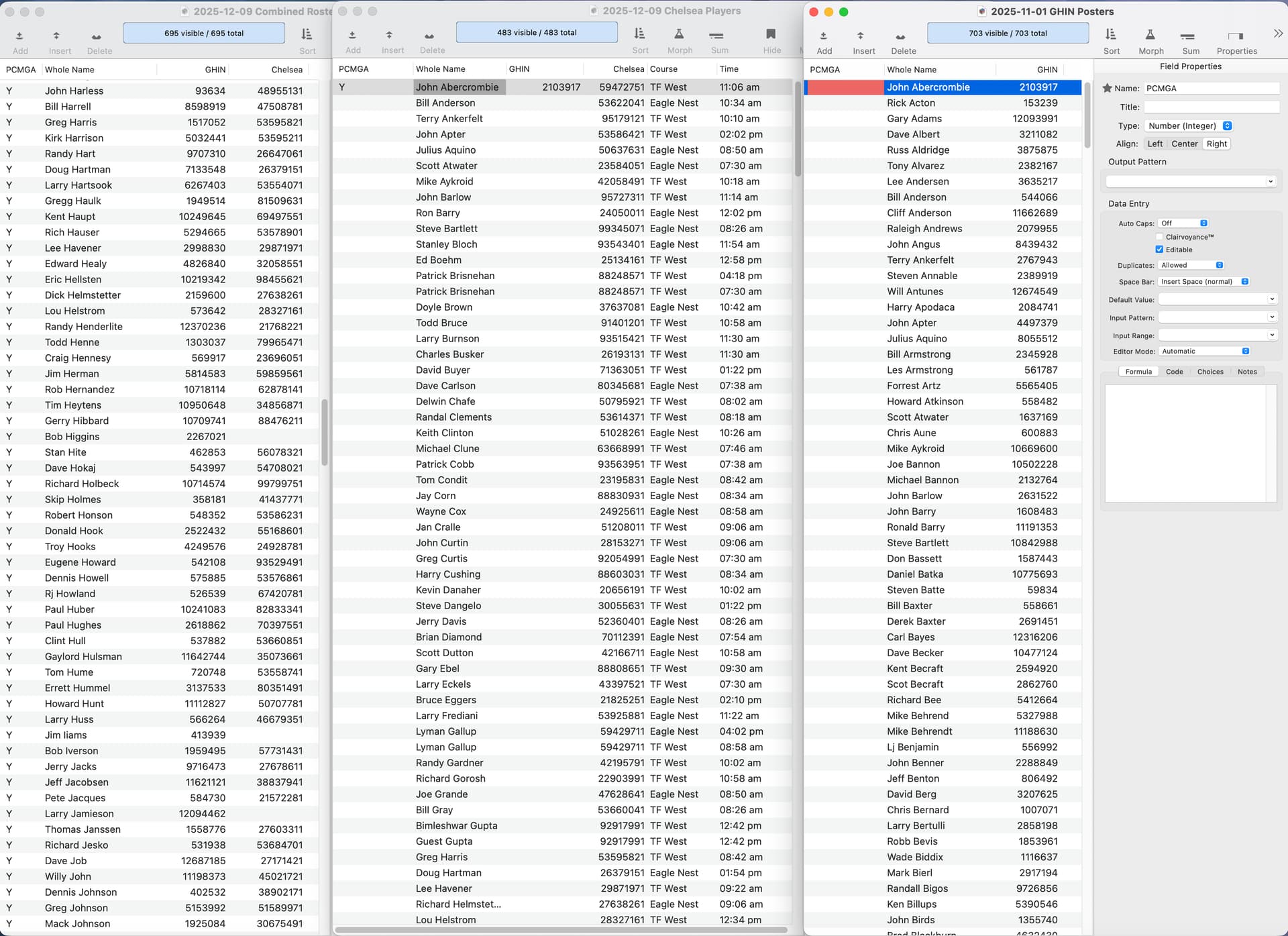
Thanks, Jim. I’ve got the three dbs homogenized with the name field being consistent across all three. I’ve set up the fields so they’re all the same. What I’d like to do is have field data move and populate fields in the other dbs. For example, move a “Y” for yes to PCGMA membership to an identically named field in db#2. In setting up the join, if I tab through the field, it comes in. What needs to happen for that field to automatically populate in db#2 from db#1 without tabbing through each record (there are hundreds of records in each db)? It is also correctly pulling over another field, but again, I’m having to tab through each record to get the values to come in. It seems some kind of “Fill” command might work….
Thanks for that, RA. Rosters and Chelsea were both set to Text as they should be. The right screen was incorrectly set to integer as you note, but I hadn’t gotten that far yet. I was only working on the first two lists. I will read/study the link you’ve given me soon and hopefully get some clarity. I still don’t know necessarily how to “mass-import” the values into the second database without “tabbing” through each record. Perhaps “Join” will bring this into focus… (It worked!)
I would then next question if you really need 3 different tables for this project. I am not seeing any duplication of the ‘Whole Name’ in any of the files. If you did have multiple records for a single person, that could then speak to a possible need for multiple tables but it seems that the only reason for the 3 tables is that they have input or source data from multiple sources. No big deal. That can all be handled via Import. One table might be more efficient.
 Copy that on the name formats. That is part of the issue and I can easily take care of that given Panorama’s very powerful tools for doing same. The other part is somehow getting the GHIN # paired up with the names in the first list (Member History). Chelsea is a unique number assigned to each player in our tee time reservation system. And, yes, the Gross Handicap Information Number is a unique number assigned by the U.S. Golf Association to each golfer with a handicap maintained on their system. The problem to be tackled is we have 700 members ± in the Men’s Golf Association (one list), players that were on the schedule that played on the day of the audit (second list) which included many non-PCMGA members that need to be filtered out, and a list of players that posted their score to the GHIN system (third list). By an exception list, I mean I’d like to get a list of the 8-15% of PCMGA players that were in the Chelsea reservation system, played on any given day, are members of the PCMGA, and did not post their score to the GHIN system. I hope that clears up some of the murky details. I’m sure this can be handled in Panorama. I’m not familiar with the “Relational Join” feature, but that is certainly what we’re dealing with…three different lists that ultimately will be used to prepare a report. Thank you for your comments!