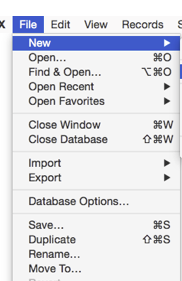
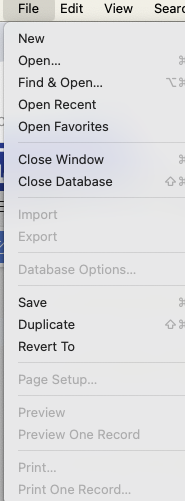
Trying to rename a database. Panarama help documentation shows rename in the file menu underneath save then duplicate, then rename. However, when I open the file menu in panorama, it does not have rename. There is only saving duplicate. How do I rename a database. Also, I thought I would be able to use save a copy as, however, I guess I don’t understand where to type these commands.
Do I create a new procedure for every command like this? When I do that, “saveacopyas” returns missing operand. When the help documentation gives many instructions, there is no indication where they go, plese clarify.
The middle portion of the File menu, below Database Options and above Page Setup, is actually generated by Apple’s code. Apple can and does change the arrangement of the menu items in different versions of macOS. The screenshot in the Help page was taken on what is now an older version of macOS, in fact it was probably called OS X at that time. I’m sure your screenshot is taken on a more recent version of macOS. It’s not practical to re-do all of the thousands of screenshots in the documentation each time a new version of macOS comes out.
When you press the option key with the menu open Duplicate changes to Save As. This allows you to save the file under a new name.
Gary is correct. I think on some versions of macOS there is also a way to permanently change Duplicate to Save As, but I don’t remember how it is done. However, this is not a Panorama setting, it is a system setting, and will affect the File menu of all applications (or at least all applications that use Apple’s standard file handling).