Zebra printers use a ZPL printer language and I am looking to see if anyone has driven a Zebra printer from Panorama.
This article, “Sending Commands (EZPL/SGD Files) to Printers on MacOS and Linux”, might be helpful.
Although this article talks about using Terminal.app to do this, you should also be able to use the lp and lpr shell commands directly from Panorama. It sounds like you have to install a CUPS driver first.
Caveat - I had never heard of ZPL or a Zebra printer before 10 minutes ago, I found this page thru a Google search. I hope this will point you in the right direction, but if you run into problems, I probably won’t be able to provide much further assistance.
Thank you for the reply. I believe that ShellScript will be my friend.
I am not figuring out how to include the value of a field into the script. The ShellScript( says it can be done and I’m going to presume that the ShellScript function can do it as well.
I have 2 fields in the db.
The field ‘Command’ contains ‘lpstat - p’
The field ‘Result_From_Terminal’ is empty.
If the procedure is:
Message FieldValue("",Command)
I get the contents of the Command field in a message.
If I run
ShellScript |||lpstat -p|||,«Result_From_Terminal»,5
I get a list of my installed printers.
But if I run either of the below, I get an error.
ShellScript |||$«FieldValue("",Command)»$|||,«Result_From_Terminal»,5
ShellScript |||$««Command»»$|||,«Result_From_Terminal»,5
FWIW, Epson has about 40% of the inkjet market. Zebra has about 35% of the barcode & thermal printer market.
Apple has had the CUPS drivers as part of the OS since 2002 and no additional driver installation is advised.
To enable the web interface, run: cupsctl WebInterface=yes
Then http://localhost:631/printers/? to see your installed printers.
I did the obvious search and came up with this: Set up your Zebra printer on a Mac | Pirate Ship Support
Unfortunately Zebra does not offer drivers for the industrial Zebra printer that I need to print to. Zebra recommends only the CUPS system to drive the printer.
I need to use the ZPL printer language to send commands to the printer and thus the ShellScript command and function will be the ticket.
The ZPL documentation is 1,769 pages and they couldn’t fit all of that into the printer setup dialog.
Think things like operating a cuttter on a roll of labels, or backfeeding or rewinding a roll.
Think things like dynamic QR Codes or Inverse fonts where your letters are white on a white label as the printer has printed a black rectangle dynamically sized to the length of the text.
Printer drivers can only do so much.
I’m not sure why those aren’t working, but the value of that field is the entirety of the script. You aren’t inserting it into anything. You should be able to just use
shellscript FieldValue("",Command),«Result_From_Terminal»,5
or
shellscript Command,«Result_From_Terminal»,5
You are correct Dave that those 2 examples work. I am at this point just trying to understand the methodolgy of comprising scripts. I figured that if I can concoct an input and get a response, I would be good to go.
When I was unable to create a formula that worked, I then broke it down to the smallest element of a formula and when I could not get just a field to work, I then asked for assistance. My formulas will have more than just a field in them.
The question here seems to be whether the result of the formula, however complex, will contain the entire command, or just a portion of it. I don’t have any printers installed on this machine, so I couldn’t use your example, but the following example works.
I used three fields, Command, Result, and Tag. In the Command field, I had this.
ls -A ~/Desktop
The Tag field contained
-A
and the result field was empty.
This runs, and gives me the correct result.
shellscript |||ls $«fieldvalue("",Tag)»$ ~/Desktop|||,Result,5
as does this.
shellscript |||ls $««Tag»»$ ~/Desktop|||,Result,5
and this
shellscript Command,Result,5
but these both result in errors.
Shellscript |||$««Command»»$|||,Result,5
and
Shellscript |||$«fieldvalue("",Command)»$|||,Result,5
Actually, I think it’s a question of whether the formula contains more than a single parameter. When you enclose the formula in ‘$«»$’, special characters in the result are escaped. That means the spaces between parameters will be escaped.
|||$«FieldValue("",Command)»$|||
is being rendered as
lpstat\ -p
instead of
lpstat -p
Write that as
ShellScript |||^«FieldValue("",Command)»^|||,«Result_From_Terminal»,5
and it should work.
Do these violate the syntax as documented?
ShellScript |||$«Command»$|||,«Result_From_Terminal»,5
ShellScript |||$««Command»»$|||,«Result_From_Terminal»,5
ShellScript |||$«FieldValue("",Command)»$|||,«Result_From_Terminal»,5
None of them work.
I do understand that you’ve come up with stuff that works but I’m trying to understand the proper/improper syntax as I’ve yet to write any valuable code and I’m trying to understand the rules before I start writing.
The problem in all of these cases is that a space is being escaped when it shouldn’t.
Instead of
lpstat -p
you are getting
lpstat\ -p
When you don’t want any of the characters produced by the formula to be escaped, you need to surround it with ^«»^ rather than $«»$.
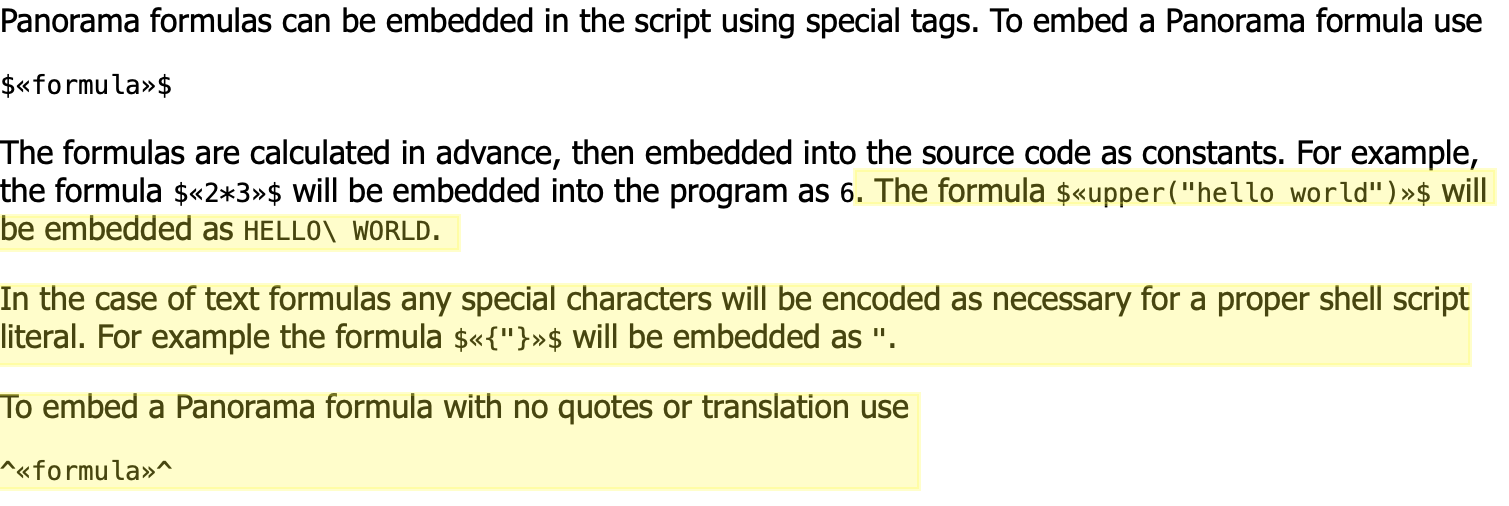
The documentation does have an error in the markdown. Instead of
$«{"}»$ will be embedded as "
it should read
$«{"}»$ will be embedded as \"
1 Like