I don’t understand how this could have happened as everything worked last night. Setting back the clock didn’t help. Pan X no longer recognizes the file pathnames used to open files in my procedures which is the only way to open files in my system. When I press the button to open a file from my Main Menu screen, nothing happens and all the menu items inn that file become gray or beep if selected except for the Quit Panorama. Total paralysis of my business.
There is little to go on here as the facts are minimal beyond that ‘nothing happens’.
Perhaps you might want to share some code for your pathnames? Debugging one of the non working issues will likely show you the problem with all of them. Have you tried restarting?
Because of the lack of given information, we can only speculate. What is the main difference between yesterday and today? Ah, the new year!
Any chance that your file names and / or your file paths are containing the old year 2025, where your code expects it to be 2026 now? Do all the file paths for the new year already exist on your computer?
Here is a screen shot that shows the procedure code, the error message and the folder showing the file does exist. This procedure copies last year’s files, purges data as needed and saves them as this year’s files. I have used the variables “Volume” and “Open" to store file pathnames such that my files can run on any hard drive just by changing the Volume field in my Main Menu file. This code has worked since Pan 3.
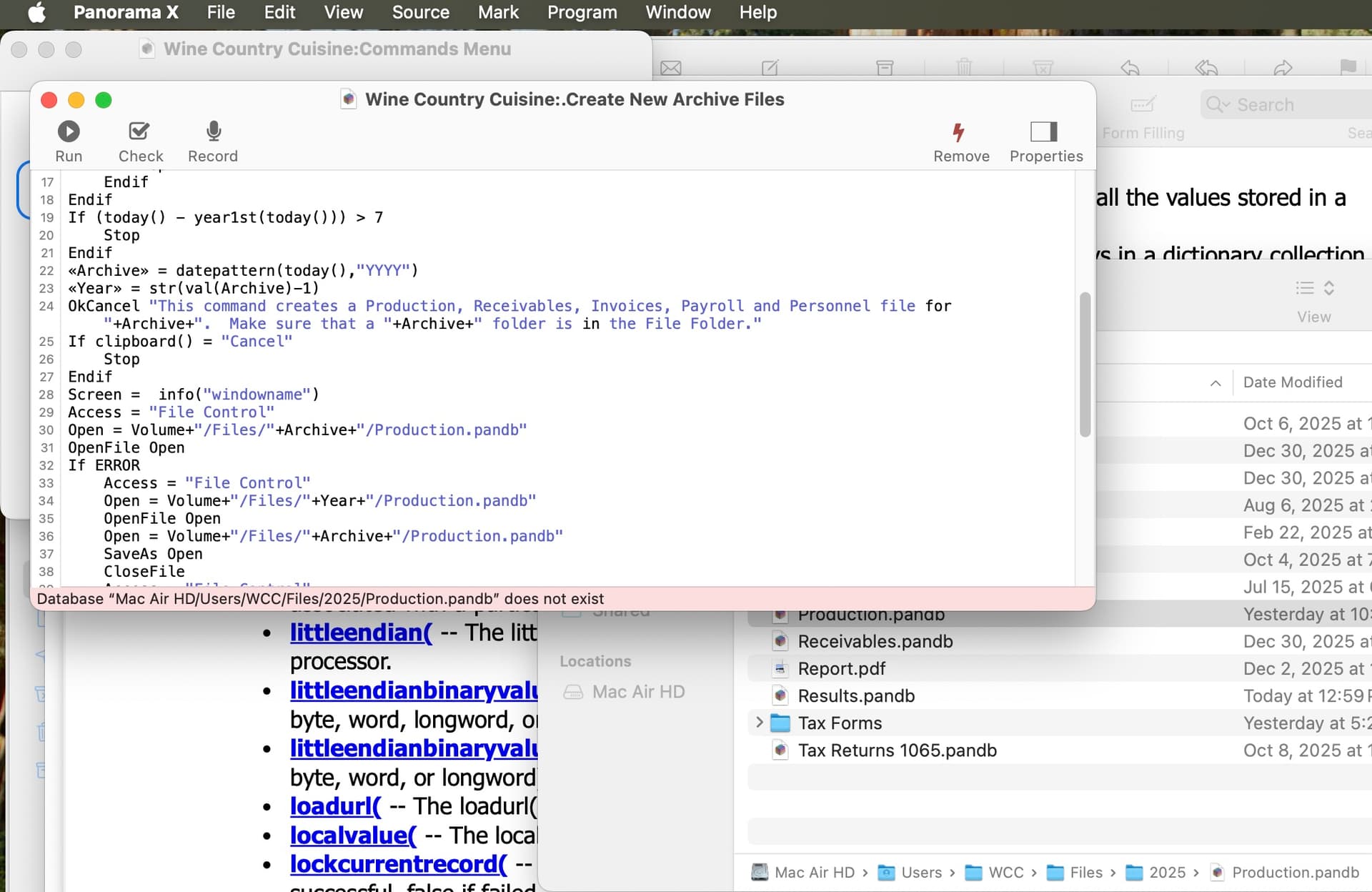

I believe the correct path for this file is
/Users/WCC/Files/2025/Production.pandb
With UNIX style paths, the boot volume is simply /. You don’t name it.
Changing the Volume name to drop the hard drive made that procedure work and it looks like that fixed the problem in other procedures. The open files procedure still doesn’t work but it has code that tests for a server hard drive and loads the file from the server if the client computer has Read Only privileges. I don’t need that feature any more. For now, it looks like I can run my business if I first open my files from the Finder but why would this all of the sudden happen today? M1 Air, OS15.6
This code has worked since Pan 3.
Since your code uses / as a separator in the paths, this statement clearly isn’t true. Up through Panorama 6, the : character had to be used as the path separator. The / character is used in UNIX paths, while the : character is used with the older HFS style paths used by Classic MacOS. So there is no way the code you are showing us would run unmodified on Panorama 6, 5, or any earlier version.
Apparently when you switched to Panorama X, you modified your code to use UNIX paths instead of HFS. But you didn’t notice that these work differently - as Dave noted the boot volume is always omitted from a UNIX path, and for a non boot volume you must put /Volumes/ in front of the volume name.
The ironic part is that if you’d just left the code alone, it would have continued to work perfectly. HFS paths are still supported in Panorama X - I went to a lot of trouble to make sure that both UNIX and HFS paths worked, and that HFS paths continued to work exactly as they did before.
All of this is thoroughly documented.
I thought converting to the UNIX path now would avoid any possible future issues since I have to do a total rewire of my files. Everything now works. Thanks to everyone for the help and Happy New Year.