I have multiple computers accessing shared files that are currently locked to my Panorama account. I want to enable these other computers to be able to access these same shared files from their personal Panorama account rather than mine.
I’ve done this before but am not finding the path to success.
Is it a single account thing? If they are permitted to be used by a different account, will my only access be by changing to their account as another computer/user or can a file be accessed by multiple accounts at the same time.
Too many shared accounts, teams, files to keep it all straight.
I’m thinking that I may have to have a different server for the files to be shared on for them to be accessed by a different Panorama account? And then I would definitely need to be a user on their account. Argh.
It sounds like you want to lock a database such that it can be accessed by two different Panorama accounts, but nobody else. If so, that is not possible. You can lock a database to one account, or you can make a database accessible to anyone. But you cannot lock it to multiple accounts.
I’m thinking that I may have to have a different server for the files to be shared on for them to be accessed by a different Panorama account? And then I would definitely need to be a user on their account.
If a file is locked to an account, the server also has to be running that same account. Otherwise the server would not be able to access the file.
So yes, if you want to have multiple accounts with locked files that are also shared, you’ll have to have a server for each account. And you’ll have to change your logon when you switch to different servers.
Argh.
Unfortunately, security is often (almost always) inconvenient. Hopefully it is even more inconvenient for possible intruders. It would be convenient if we could live with our doors unlocked and our keys in our cars, but that’s not the world we live in today.
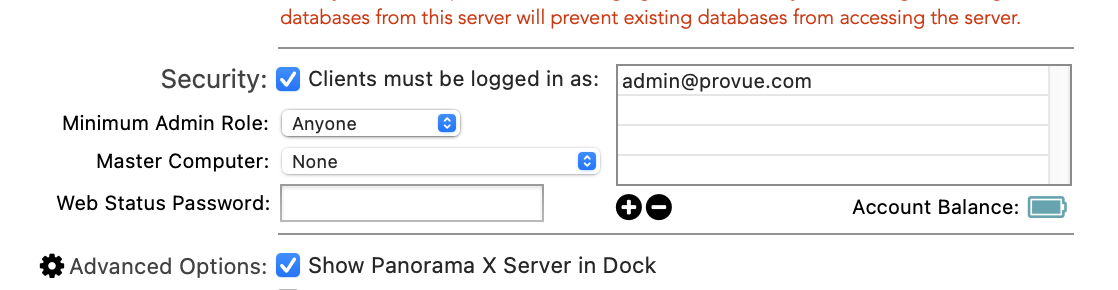
This Help page, I think, is what I want to do. But my Preferences screen does not look like this. I did find the certificate button, but I can not find the Authorize Additional Account section of my Preferences. Did this feature exist, then was later removed and Help file needs adjusting?
The current version of this panel does look slightly different, some additional features have been added, but the position of the + button has not changed.
Perhaps it is, but it is definitely not what you asked for in your original post. This feature restricts access to the server, but it does NOT restrict access to an individual database. In fact, if you DO lock a database to an account, users that are logged on to a different account won’t be able to access restricted operations for that database even if they do have access to the server.
The reasons I said my Preferences were different is because…
My Panorama X Preferences window has these tabs…
General, Warnings, Advanced, Favorites, Channels, Client, Instrumentation
My Help File shows Panorama X Preferences window as…
General, Warnings, Advanced, Channels, Client, Server, Logging, Apache
My only thought left is that I must access the Preferences on the computer that is actually running the server. Dang. I do not have ready access to that computer. When I saw that I could capture a certificate from the Site License page, I presumed that the Server Settings could be altered from that same computer, or the Server Administration page. Alas.
My only thought left is that I must access the Preferences on the computer that is actually running the server. Dang.
Of course, a preference setting that affects a particular server must be run on the server computer itself. It would be a pretty significant security breach if you could control server security settings from a remote computer you don’t have access to!