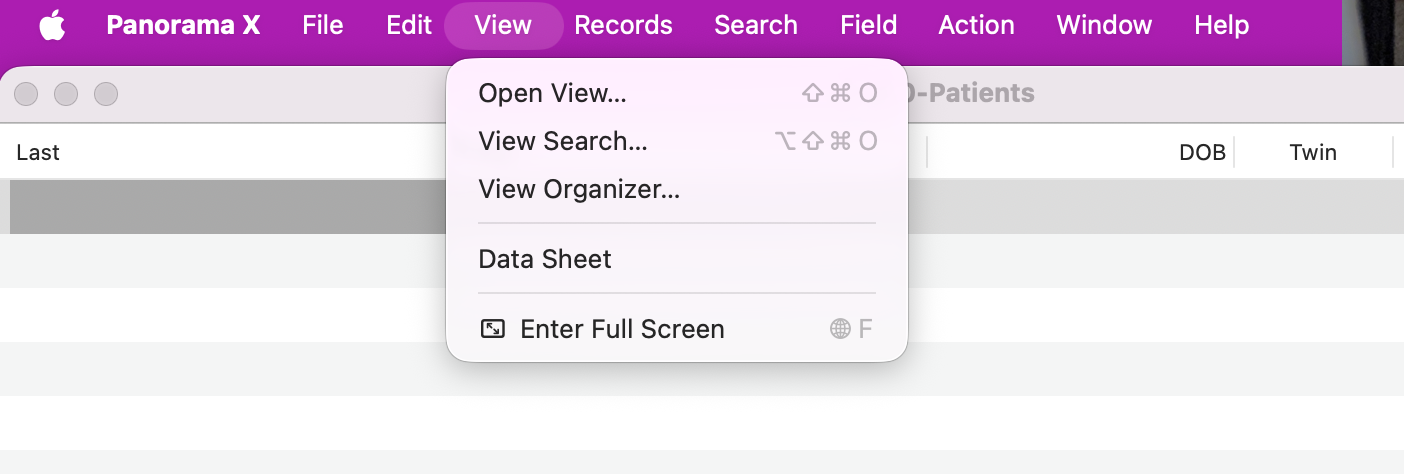
On 1 computer, using 1 db, I am not getting Forms or Procedures but ‘Enter Full Screen’ instead. Using other dbs on that computer, and using that db on another computer (these are shared files), the View menu properly shows Forms & procedures. There are 2 Forms open on the db that is experiencing this issue. (The second windows was opened via a button on the 1st Form. I then created a button with a procedure to OpenSheet which opened a 3rd window but still no Forms or Procedures.)
Sorry for the previous confusion. Another thread seemed similar but perhaps not.
This is not an attempt to open a View Organizer window but rather I should be seeing Forms & Procedures, but am not. The particular window is not relevent as it appears to happen to any window. When the ‘Enter Full Screen’ first showed, I only had one form window open. I opened a 2nd window via a button that I created so as to use a Procedure pane to accomplish a 2nd window open (I used OpenSheet). Still no Forms or Procedures. I am the logged in user and there are no other levels of rights. Other dbs on this computer are fine. This db is fine on another computer.
Just not sure how to get it out of this mode and see my other Forms & Procedures. The window in the screenshot is the Datasheet. Opening the View Organizer shows no Forms or Procedures.