I’m trying to build a project to plan delivery routes using the Leaflet.js mapping API. At this point, I am using the supplied HTML and JavaScript files provided by Leaflet. When correctly set up, when I put the following into BBEdit it displays the map, with markers and several buttons, one of which is shows a drop-down list of locations. BBEdit does this internally or via a preview in Safari. When the indentical code is run in Panorama X, on Tahoe, the map loads, the markers don’t and the drop-down list of locations is empty.
<!DOCTYPE html>
<html lang="en">
<head>
<meta charset="UTF-8">
<meta name="viewport" content="width=device-width, initial-scale=1.0">
<title>Multiple Locations on Map</title>
<!-- Leaflet CSS -->
<link rel="stylesheet" href="https://unpkg.com/leaflet@1.7.1/dist/leaflet.css" integrity="sha512-xodZBNTC5n17Xt2atTPuE1HxjVMSvLVW9ocqUKLsCC5CXdbqCmblAshOMAS6/keqq/sMZMZ19scR4PsZChSR7A==" crossorigin=""/>
<!-- Leaflet JS -->
<script src="https://unpkg.com/leaflet@1.7.1/dist/leaflet.js" integrity="sha512-XQoYMqMTK8LvdxXYG3nZ448hOEQiglfqkJs1NOQV44cWnUrBc8PkAOcXy20w0vlaXaVUearIOBhiXZ5V3ynxwA==" crossorigin=""></script>
<!-- Custom Styles -->
<link rel="stylesheet" type="text/css" href="css/styles.css">
</head>
<body>
<div id="mymap" style="height: 600px;"></div>
<h2 class="heading"> Some Indian Monuments </h2>
<div class="button-group flex-style">
<div class="component1">
<button class="map-zoom-out-btn"> Map Zoom Out </button>
</div>
<div class="component2">
<select class="select-dropdown" name="dropdown">
<option> Select any monument </option>
</select>
<button class="search-btn"> Search </button>
</div>
</div>
<footer class="footer flex-style"> Made Using Leaflet JS | <a href="" target="_blank"> Source Code</a> <a href="" target="_blank"> <img src="assets/github-icon.png" /> </a> </footer>
<script>
let map = L.map('mymap').setView([19.5937, 78.9629], 5);
let ourData = [];
L.tileLayer('https://{s}.tile.openstreetmap.org/{z}/{x}/{y}.png', {
attribution: '© OpenStreetMap contributors',
maxZoom: 20,
minZoom: 2,
tileSize: 512,
zoomOffset: -1
}).addTo(map);
let iconOption = {
    iconUrl: "./assets/location-marker.svg",
    iconSize: [30, 30]
};
let ourCustomIcon = L.icon(iconOption);
fetch('./assets/location-data.json')
.then(response => response.json())
.then(data => {
ourData = data;
for(let i=0;i<data.length;i++) {
let option = document.createElement("option");
option.value = i+1;
option.text = data[i].title;
document.querySelector(".select-dropdown").appendChild(option);
let marker = L.marker([data[i].latitude, data[i].longitude], {icon: ourCustomIcon}).bindPopup(`<h3> ${data[i].title} </h3> <p> ${data[i].description} </p>`).on('click', () => {
map.flyTo([data[i].latitude, data[i].longitude], data[i].zoomLevel);
}).addTo(map);
}
})
.catch(error => alert(error))
document.querySelector(".map-zoom-out-btn").addEventListener('click', () => {
map.flyTo([19.5937, 78.9629], 5);
});
document.querySelector(".search-btn").addEventListener('click', () => {
let select = document.querySelector(".select-dropdown");
let value = select.options[select.selectedIndex].value;
map.flyTo([ourData[value-1].latitude, ourData[value-1].longitude], ourData[value-1].zoomLevel);
});
</script>
</body>
</html>
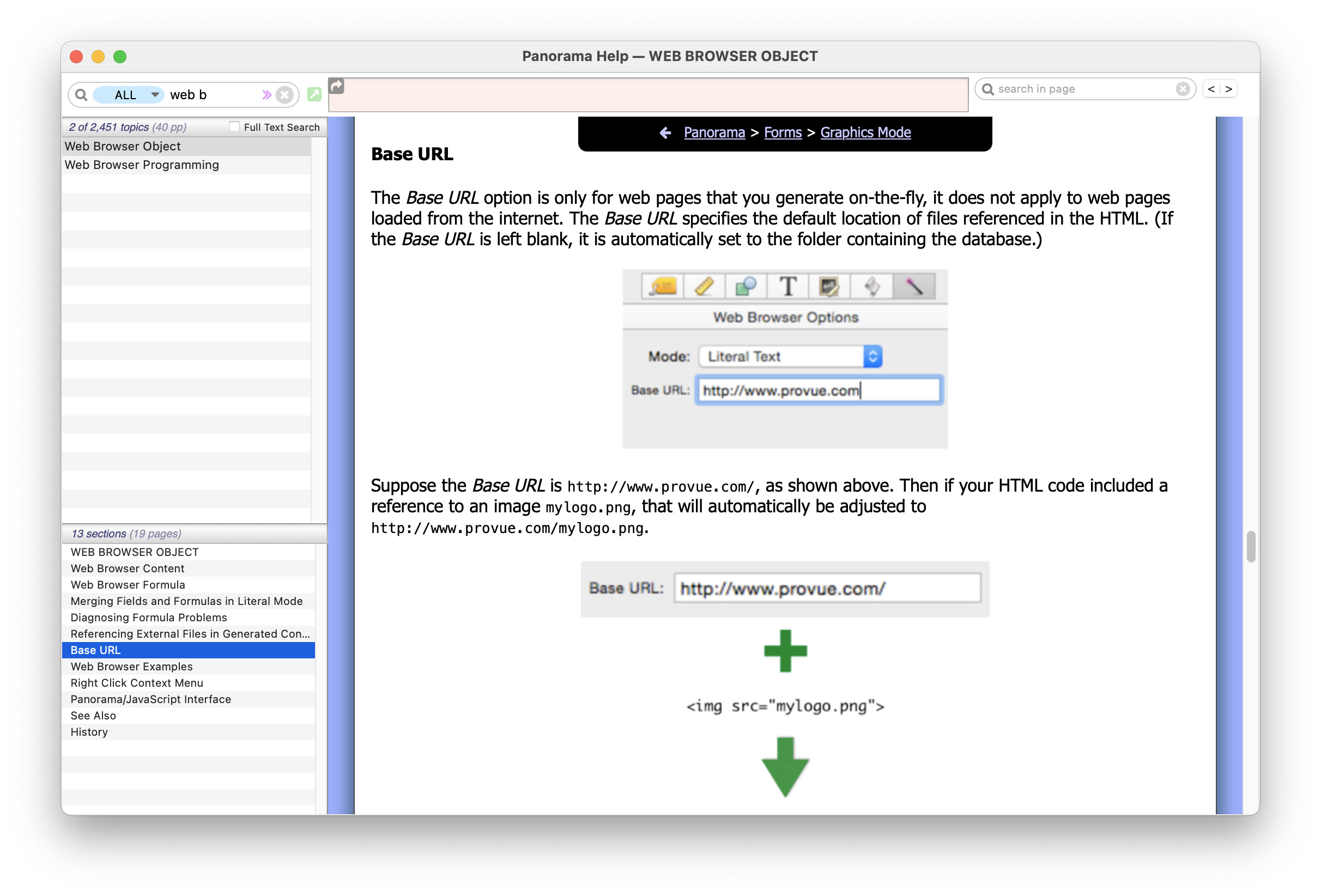
I think that the problem lies in the two statements with file references in the JavaScript …
let iconOption = {
iconUrl: "./assets/location-marker.svg",
iconSize: [30, 30]
};
and
fetch('./assets/location-data.json')
Any thoughts (or any experience with Leaflet). Thank you!