I get a message saying I have been working offline and then puzzles appear interrupting my ability to use panorama. But the internet is on.
This almost certainly means that you are using a version of Panorama X that is several years old. I would recommend that you drag your copy of PanoramaX.app into the trash and empty it, and then go to prove.com and download the latest copy (click on Download Trial and then follow the instructions to install).
I installed the new panorama, but now when I open the documents they won’t open because they are damaged. So are some other documents. Can I restore them?
Open up the Settings… panel from the Panorama X menu. Go to the Advanced tab and uncheck the database integrity box. Now your databases should open without an error.
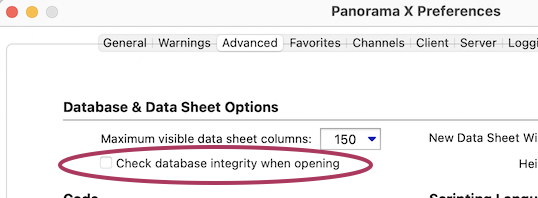
And search Panorama Help for ‘damaged’ for more information.
Thanks for saving me work of restoring the data.
Hopefully Gary’s suggestion got you working again, but that is a band-aid, not a fix.
Based on your description of symptoms, you have been using multiple different versions of Panorama. You either have more than one copy of Panorama on your computer, or you are switching back and forth between multiple computers that have different versions. Either way, you should go thru all of your computers and find ALL of the older versions of Panorama and get rid of them. Ideally you should have only one version of Panorama on each computer, and it should be the most recent version.
You can leave the Check database integrity when opening setting turned off permanently, but I wouldn’t recommend that as that leaves you without an important safety check. Instead, with that check off you should open and save all of your databases. Once you’ve done that, you can turn the Check database integrity when opening setting back on again. As long as you’ve gotten rid of all of your old copies of PanoramaX.app, you won’t have any further problems.
This exact problem, with the cause and the fix, is described in the Panorama X documentation.