Display result in color for math with variable in ?( function

Actually two questions. They both involve the same form. And I’ve scoured through the Forum (usually without logging in) to no avail. So here are my questions.

Math with variable values won’t work since they are text, right? For instance, “myCredit - myDebit” produces a type mismatch. However the following works fine, and will display either a positive or negative number in a TD object depending on the underlying values. Example: “$234.56” OR “- $234.56”.

Pattern(arraynumerictotal(myCredit, ¶)  - arraynumerictotal(myDebit, ¶), “$#,.##”)

However, I want to display any negative result in color using ?( true/false in a form TD object. The following DOES NOT work. It displays a positive value correctly and for a negative value the result is an error – “cannot subtract a number from text”. So the question is, how to display a negative value in color? I’ve tried several variations on the following, including omitting the Pattern( function .

?(Pattern(arraynumerictotal(myCredit, ¶)  - arraynumerictotal(myDebit, ¶), “$#,.##”) <0,
“color:FF0000” + Pattern(arraynumerictotal(myCredit, ¶)  - arraynumerictotal(myDebit, ¶), “$#,.##”), Pattern(arraynumerictotal(myCredit, ¶)  - arraynumerictotal(myDebit, ¶), “$#,.##”))
{“color:FF0000" +}  seems to be the culprit.  It chokes at the “+” sign.

Second Question:

A PopUp menu listing choices of Months is blank when the form is opened with .Initialize even though the variable ‘monthList’ is declared in the procedure. A msg stmt at the end of .Initialize confirms that is correct.
monthList = datepattern(TransactionDate, “MONTH YYYY”)

Upon form opening, all 20+ TD objects show their text or numeric values and totals correctly. But the PopUp is blank until a selection is made, in spite of the msg stmt showing the assignment is correct. And everything else works –– except for the color issue.

I’m obviously overlooking something here that should be simple. Thanks for any education on these two issues.
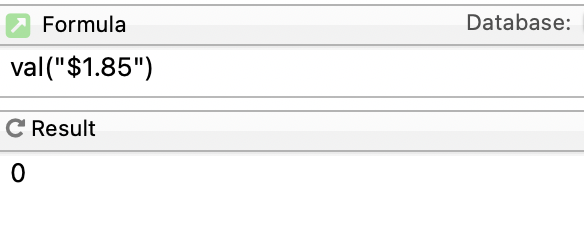
No. That’s wrong.

let A = 1.23
let B = 3.45
let C = B - A
message C

will display 2.22 in the message.

The problem with your formula lies in the comparison

    pattern( a bunch of parameters) <0

The pattern( function produces text as its output. Zero is a number. You can’t compare text to a number.

My guess is that myCredit and myDebit were both assigned the results of pattern( functions, and that’s why they both contain text.

Use val(myCredit)-val(myDebit)

Depending on the pattern. $ signs could mess that up.

That’s true Dave. I was assuming the “$” was added with the pattern function but he never really finished his pattern so we can’t tell if the dollar sign is added in the function or if it’s in the variable itself.

First you have to make sure you have Rich Text enabled for the Text Display Object. A formula something like this should display negative values in your chosen color.


?(val(arraynumerictotal(myCredit, ¶))-
val(arraynumerictotal(myDebit, ¶))<0,"color:FF0000","")+
pattern(val(arraynumerictotal(myCredit, ¶))-
val(arraynumerictotal(myDebit, ¶)),“$#,.##”)

Try adding showvariables monthList at the end of your .Initialize procedure. This should update the form which was probably created before the variable was defined.

Thanks to Dave, Jeff, Gary for the responses.

Bingo! Solution found!

So simple! Simply enclose the myCredit - myDebit calculation in parentheses to force the calculation separately from the {“color:FF0000" +} and Pattern( part of the formula. Duh! Why didn’t I think of that sooner!! Here is the verifiable formula:

?(val(myCredit)- val(myDebit) < 0,
“color:FF0000” +Pattern(val(myCredit)-val(myDebit), “ $ #,.##”),
Pattern(val(myCredit) - val(myDebit), “$ #,.##”))

It produces a negative result in red, and positive result in basic black.

I guess also using ArrayNumericTotal( would also work, but that was a very long and kludgy construction and a pain to type out correctly. And yeah, Dave you’re right. I shoulda known that variables can be used in math. Duh again. I simply got lost in a mental sinkhole in trying to use the Pattern( and in the formula. Had also tried Val( but that also returned an error without the ( ) part of the construction.

(Actually, been out of the game since late Pan 6 over 10 years ago when I retired my small home based marketing consultancy and just recently, at 77 decided to explore Pan X to keep my brain working as well do some data cleanup - mailing and donor lists etc for a local non-profit. Which is what Pan is so good at. As far as brain actually working…that may be debatable.)

The blank PopUp at initialization is still a mystery. And yes, variables are defined and I always use ShowVariables at or near the end of any procedure. So I gotta figure that one out next. It’s not really essential, but it would make things prettier, so to speak.

Thanks again. Back to working and lurking.

MichaelC - I don’t know how much procedure code references your myCredit and myDebit fields, but it seems everywhere you go, you’ll be converting them to numeric with a Val( function. Now this might be a radical idea, but why not just make them numeric type?

The field names are great, very descriptive. But I saw them in a procedure; my first imagining would be, “I imagine they’re numeric money amounts.”

Also, ‘twere it me - and this is just geezer style/tradition - I’d do the calculation once and store it in myCalc

local myCalc

myCalc = myCredit-myDebit

?(myClac < 0,
“color:FF0000” +Pattern(myCalc, “ $ #,.##”),
Pattern(myCalc, “$ #,.##”))

If you need to check things later, you have less nested activity to dig into. But style is definitely in the eye of the beholder. Some revel in using the least amount of steps and procedure text.

I remember having to debug someone’s Visual Basic program where function calls were used as parameters in subroutine calls. When the routine wasn’t behaving as expected, there were more than a few routes traversed before the “error point” became apparent (sparing you the “had a child” alternative).

With today’s CPU speeds and RAM levels, an extra field usually doesn’t cost much. You could add myCalc (or whatever you want to call it) as another field and, in your initialization routine, do a formula fill for myCalc = myCredit-myDebit. But maybe you just do formulaFill with imported data and then calculate record by record if you change the amounts manually.

Without seeing your program, I don’t know the best place to put that calculation. My guess is you’d have it attached to both the myCredit and myDebit fields so any manual change in a record would recalculate myCalc for that record.

Here is a shot in the dark but it would account for all the behavior you are seeing. If you are creating the monthList as a local variable in your .Initialize procedure it will only be active while the procedure is running. In the mean time the Text Display Object has created a fileglobal variable named mmonthList that has not been given a value. So when the .Initialize shows a message at the end it will have the local variables values and not the fileglobal variable’s values. Now if another procedure subsequently gives the monthList a value it will go to the fileglobal of the TEO since your original local variable no longer exists. Now it will show in the form as expected.

This is all a guess on my part..

Thanks Paul. Putting the calculation into a single variable makes sense. Hadn’t thought of that yet.

Actually what I have is pretty simple. This is basically downloaded bank data, and my PopUp selects by month (may add quarterly later) and at the end of that month selection procedure, my Credit and Debit variables are assigned like this since they are going to vary by month:

myDebit = ArrayNumericTotal(ArraySelectedBuild(¶, “”, {Amount}, {MainCategory ≠ “Credit” AND MainCategory ≠ “Deposits”}), ¶)
myCredit = ArrayNumericTotal(ArraySelectedBuild(¶, “”, {«Amount»}, {MainCategory = “Credit” OR MainCategory = “Deposits”}),¶)

Anything that isn’t explicitly a Credit or Deposit to the account is, by definition, a Debit. Keeping it simple.

All I’m looking for is the total by selected month. Each of those broad categories (Debit or Credit) are displayed on the form in a TDSO, plus another TDSO for the ?( +/- calculation mentioned previously. And the result I posted earlier works just fine.

As for separate fields for Debit & Credit, no. Just the Amount field. So it’s a bit different from what you might have assumed. Debit & Credit are calculated by assigning transactions to a single MainCategory field. In my case, 10 categories like household, utilities, insurance, food & dining, medical, etc. 10 Categories with Merchants and amounts for each, plus the total for each Category on the form. So I know what I’m spending & where each month.

BTW, my bank records have 17 Categories and 41 SubCategories – 48 total!! – so I have a procedure that whips through those monthly downloads (If loop) and cuts that down to 10 and dumps them into my MainCategory field as above. Makes much more sense, and much more manageable for my calculations. And Pan is so fast if you blink you’d miss it.

Thanks again for your input here, and If you have any ideas on my initially blank PopUp, do lemme know!

Thanks, Gary. monthList is a fileglobal in the .initialize, and again ShowVariables is the last line in that procedure (along with myCredit and myDebit variables). The monthList is declared as:

monthList = datepattern(TransactionDate, “MONTH YYYY”)

And I would assume that the PopUp would initially show whatever month is displayed in the last saved version. Could be Apr, May, whatever. But obviously I’m wrong about that. Is there some other action or statement that should be included in the .Initialize to make it work?

The PopUp is a comma delimited list of months. (May 2026, Apr 2026, Mar 2026, etc) and the attached procedure simply calls my ‘selectMonth’ procedure with if statements –– and all work just fine once I choose a month!

If monthList = “Apr 2026”
select exportcell(«TransactionDate») match “04/*/26”
endif

Does all that make sense? Am I missing something? Like I said, I’ve been out of the game for a decade or so. Lots o’ brain cells have turned to dust…. ; ). And thanks for your thoughts on this.

All I’m looking for is the total by selected month.

Instead of using arraynumerictotal(arrayselectedbuild( I think you could simply use the aggregate( function. Faster and simpler.

And I would assume that the PopUp would initially show whatever month is displayed in the last saved version.

No, not unless you saved it in a permanent variable. Which it sounds like might be what you want to do.

I think there is something you are not telling us about your popup menu. I was going to suggest showvariables but you claim you’ve already taken care of that so there is something else that is not being explained. It’s certainly possible to have a popup menu initialize properly when a form is opened.