Another very tiny issue. I want to create a dashed line with a procedure. I can do that with the newformobject statement, but I don’t see any way to control the length of the dash and intervening space (the Dash Pattern on the Line Appearance Panel). Is there a property that can be used to control this?
When I test it in a new form with a single line object and a manually customized dash pattern, I get this blueprint for that dashed line:
changeobject 1, // "LineShapeObject",
    "rectangle",rectanglesize(182, 131, 72, 72),
    "color",htmlrgb("000000"),
    "name","",
    "Tags","",
    "$ShadowBrightness","0%",
    "$ShadowOpacity","75%",
    "Opacity","100 %",
    "$ShadowDepth","6",
    "$LineSlope","Negative",
    "$ShadowBlur","10",
    "$Stroke","Dashed",
    "Procedure","",
    "Expandable","0",
    "$Fill","Solid",
    "$LineCapStyle","Butt",
    "$ShadowAngle","45°",
    "$DropShadow","0",
    "ExpandShrink","0",
    "Locked","0",
    "LineWidth","5 px",
    "$VerticalLine","0",
    "$ToolTip","",
    "$HorizontalLine","0"
I don’t see if the dash pattern is defined somewhere …
That’s exactly what I see, and don’t see.
The dash pattern is not supported by blueprints.
There is an undocumented way to control the dash pattern in the newformobject and changeformobject statements.
To set the dash on length, use $Dash0Slider.
To set the dash off length, use $Dash1Slider.
To set the dash “phase”, use $DashPhaseSlider.
For example:
changeobject 1,
    ...
    "$Dash0Slider",20,"$Dash1Slider",30,"$DashPhaseSlider",10,
    ...
This will produce a dash pattern like this:
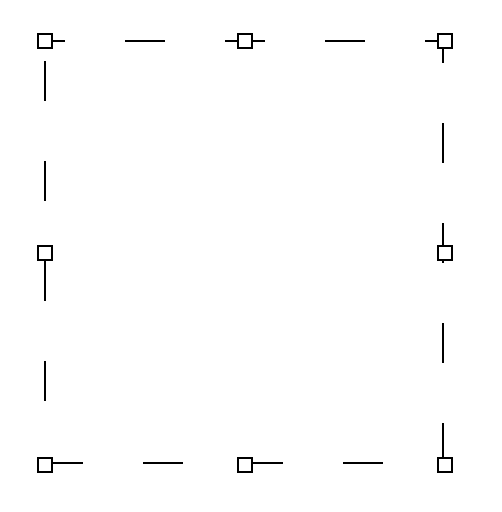
Note that these identifiers are internal to Panorama, and weren’t meant to be published. They could possibly change in the future, though they probably won’t.
Thanks Jim.