The View Menu does not show View Organizer as an option when one View Organizer window is already open. Instead, it changes to Enter Full Screen.

It does not show View Organizer, if View Organizer is the active window.
Thanks Kurt. I see that now. Has it always been like that?
I am not sure if that came with b7 or b8.
In a similar way, I was irritated that the menu item Open Favorites does not appear in the File menu, when I launch Panorama X without opening a database).

As soon as I open a database, “Open Favorites” appears in the File menu.

When I close the last open database, the command remains in the File menu.

The missing View Organizer menu item started with b7. When the View Search menu item was added, I neglected to extend the length of this truncated View menu. I have just made this fix for the b9 release. In the meantime, you can also open a second View Organizer by choosing the Window>New View Organizer Window command.
I can confirm the problem with the File menu on launch. I seem to recall that this was a longstanding problem with 0.1 beta versions that was difficult to get working properly, apparently some change in 10.2 has broken this again. I have put this issue into Bitbucket.
On 1 computer, using 1 db, I am not getting Forms or Procedures but ‘Enter Full Screen’ instead. Using other dbs on that computer, and using that db on another computer (these are shared files), the View menu properly shows Forms & procedures. There are 2 Forms open on the db that is experiencing this issue. (The second windows was opened via a button on the 1st Form. I then created a button with a procedure to OpenSheet which opened a 3rd window but still no Forms or Procedures.)
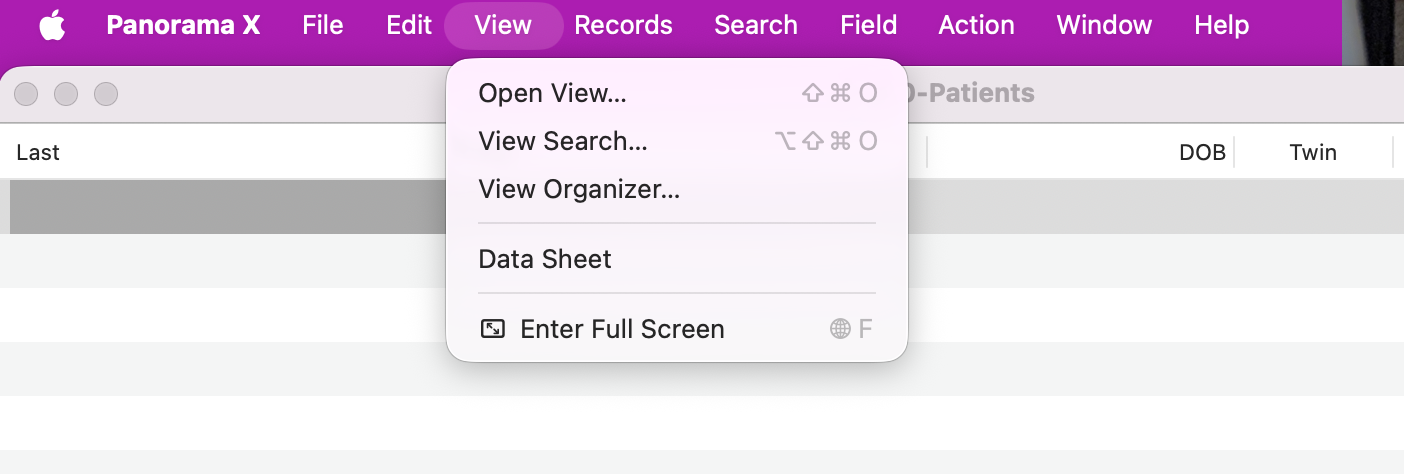
I’m not really understanding your post.
The title of the post is “Can’t open 2 View Organizer Windows.” However, the body of the post, and thee screenshot, doesn’t mention the View Organizer at all. In any case, I am able to open 2, 3, 4 or more View Organizer windows, no problem.
Your screenshot is tightly cropped. As such, it seems to be missing showing us what the active window is. Depending on what the active window is, that View menu could be perfectly normal. The View menu you are showing is what I would expect to see if the security settings for the database were set up so that you weren’t authorized to modify the database design.