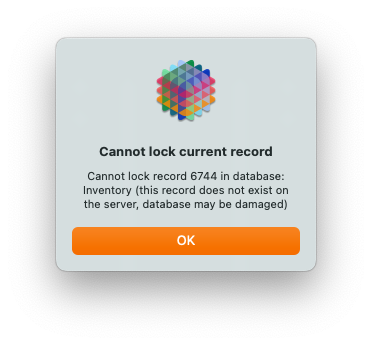
I don’t know what you mean by “push the data up”, there is no such capability.
In the situation you describe, the only solution I know of would be to detach the local database from the server, turning it back into a single user database.
Next, you would delete the server copy of the database (using the Server Admin wizard).
The final step would be to convert your detached single user database back into a shared database, which would upload it.
Of course this leaves the mystery of what happened to these records in the first place. I’ve not heard of a problem like this before. I believe you have been writing web code on this database, it is certainly possible to delete records on the server that way. I’m sure you’ve been careful, so that seems unlikely. But you might want to review the web publishing code you’ve written.
That’s not implying that your local data is corrupt, it is flat out telling you that it is corrupt. That’s an error message I would only expect to see if there is faulty RAM in the computer.
Panorama checks the structure of the database when you open it and when you save it. If it fails the check when opening, it won’t allow you to open the database (for example this could happen if there was a problem with your hard disk). If it fails the check when saving, it won’t allow you to save, so that the corrupted structure doesn’t get permanently persisted. In that case, you should be able to close the database and re-open it. You’ll lose your changes, but you’ll also lose the corruption and get back to a “clean” copy of the database.
When I follow these steps and attempt to re-upload the single-user database, I get this error.
This is the same database that just got the CORRUPTED DATA error message, right? As I mentioned, Panorama checks the data structure before saving, but I don’t think it performs that check before uploading. It really should, but I never thought of that case. If you tried to upload a corrupted database, I can imagine that this scenario would result. As part of the upload process the server software will save the database on the server, but if it is corrupted that won’t work. The code really should be engineered to catch the error earlier in the process, but I don’t think it is.
If you can, it might be worth trying to export the data to a text file and re-importing it into a Panorama database. I’ve never heard of that being necessary in Panorama X, but it seems like that might be a prudent course. Assuming that it’s not too corrupted to perform the export.
I had something like this years ago and it was indeed bad RAM. It was a newish machine so I was resisting the idea that it was hardware but then the problem started showing up in image files i was working on. So i started swapping DIMMs around and eventually isolated the issue to one module, which, when replaced, fixed the problem. If the problem comes back, check your RAM!!
That must have been a really really long time ago if you had a Mac with removable DIMMs. Though I guess maybe the Intel Mac Pros had this up to the end, but other than that it has been a long while.
Wait, was that really in 1996? Are you sure it wasn’t sometime after 2000? It would have been a much shorter drive for me if it was after 2000. I think maybe that wasn’t Pleasantville, but maybe a later movie? Maybe 300? That would have been 2007 or so. So “only” 18 years ago, not 29!!!